— CDE Sync™ —
CDE Sync™ synchronises your data across every CDE platform, automatically.
CDE Sync™ eliminates the manual effort
of managing information across your
CDE vendor platforms. Your team gets the
right information, in the right place, at the
right time, and can focus on the work
that actually moves the project forward.
— 1. The industry problem —
Your CDE platforms run your project.
They just can’t share data with each other.
A single infrastructure project routinely runs Autodesk Construction Cloud for design, Bentley ProjectWise for the engineering estate, Aconex for correspondence, SharePoint for the client's own records, and a contractor stack that nobody outside the contractor controls. Each one has its own metadata structure and versioning logic.
So the data gets moved by hand. Someone downloads a file, renames it, reformats the metadata to suit the destination, re-uploads it, then revalidates it. On a large programme that happens thousands of times across a lifecycle, and every repetition is a chance to introduce a version mismatch that nobody notices until it matters.
The usual responses do not hold. Mandating one platform across the supply chain fails the moment a consultant or a joint venture partner has their own enterprise agreement. Building a custom integration puts a maintenance liability on your own team. Doing nothing means paying for the manual effort forever.
— 2. The cost of the problem —
Manual data handling costs are hidden. It builds via searching, duplicate entry, and rework.
FMI and PlanGrid found that construction workers spend around 14 hours a week on non-productive activity, including looking for information, resolving conflicts and reworking what was already done. Across the US industry alone they put the labour cost at approximately USD $177.5 billion a year. The assessment is that large infrastructure projects typically run around 20 per cent longer than scheduled and generally up to 80% over planned budget.
— 3. What CDE Sync™ Does —
CDE Sync™ integrates CDE platforms to enable seamless data connectivity.
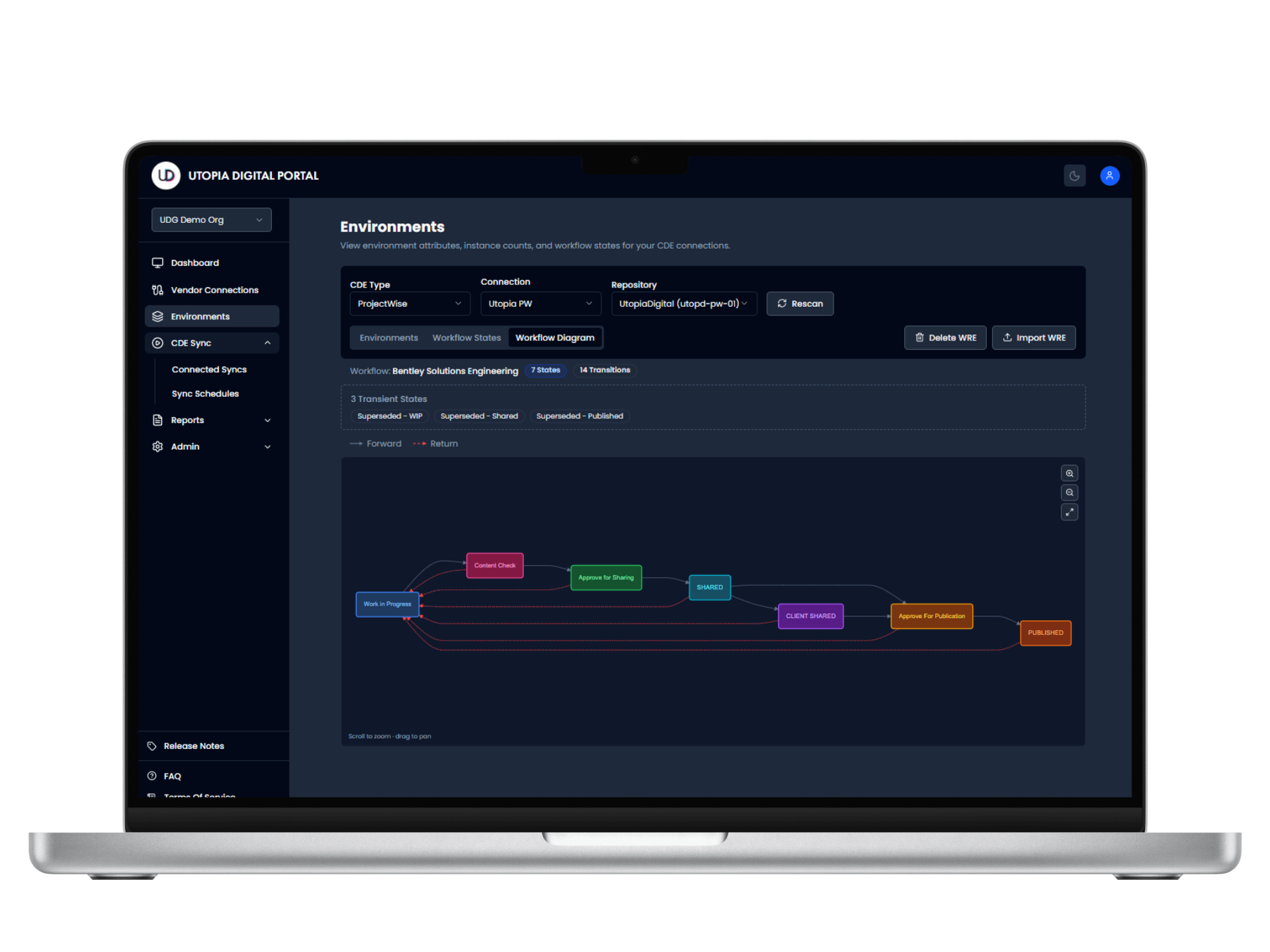
CDE Sync™ enables connectivity to drive a single-source-of-truth for your project. Users can configure source + destination locations, define mapping rules for data and metadata migration, and monitor syncs via an intuitive wizard-journey.

Serverless. Secure. Region-smart. No-code simplicity. Globally connected. Regionally hosted. Stress-free synchronisation.
— 4. How CDE Sync™ works —
CDE Sync™ is setup and synchronising in 15-30 minutes, not 15-30 weeks...
— 5. The CDE product family —
CDE Sync™ is the foundation. Four products extend it.
CDE Sync keeps live platforms aligned. Issues Sync™ does the same for the issues, RFIs and defects raised against those files. CDE Backup™ runs the same engine on a schedule into storage you own, as a restorable copy. CDE Migrate™ handles a one-time move to a different platform. CDE Archive™ moves the completed record into your own tenancy at project close.
Five products. Two engines.
One project lifecycle.
Every product shares the same connectors, the same zero file persistence architecture and the same SOC 2 Type II controls. What changes is what moves, how often, and where it lands.
Which product is which
The two pairs people confuse are Sync against Backup, and Migrate against Archive. In both cases the engine is the same and the destination decides the product. Select a row to open it in the lifecycle view.
| Product | What moves | Direction | Frequency | Destination | Typical trigger |
|---|
— 6. CDE Sync™ Architecture —
CDE Sync™ integrates your project’s Digital Ecosystem.
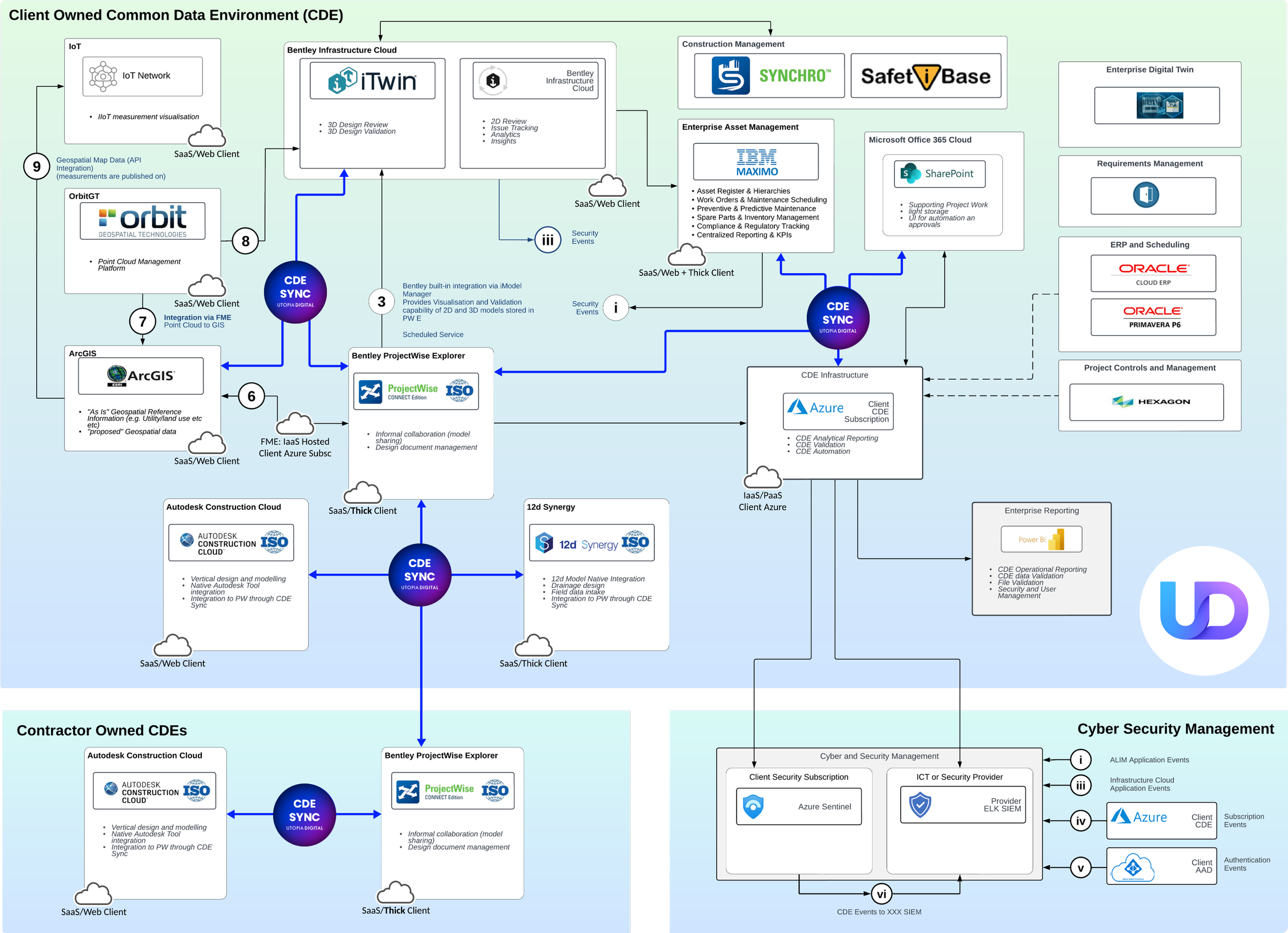
CDE Sync™ is industry agnostic. It is used in industries such as transportation, mining, the built environment, renewable energy, and beyond. It’s used on projects where data synchronisation is critical for timely collaboration and creating a single-source-of-truth is essential for project success.
— 7. CDE Sync™ Benefits —
CDE Sync™ benefits your entire project team.
PlanGrid and FMI identifies factors costing the construction industry over $177 billion annually due to inefficiencies, rework, and poor communication, directly highlighting the financial impact of inadequate data management and poorly integrated systems.

BIM Managers
Maintain federated model integrity across disparate platforms. CDE Sync™ synchronises IFC models, native files, and associated metadata between Autodesk Construction Cloud, Bentley ProjectWise, and other CDEs without breaking version lineage or losing critical model properties. You control the sync rules and mapping logic, the platform handles the execution and maintains traceability across your model federation.

Document Controllers
Eliminate manual file transfers between platforms. CDE Sync™ automates the movement of documents, drawings, and models across multiple CDEs while maintaining version control, metadata accuracy, and audit trails. You'll spend less time on repetitive uploads and downloads, and more time on quality assurance, compliance validation, and supporting project delivery teams with reliable information workflows.

Design Managers
Oversee multi-disciplinary teams using different platforms without forcing vendor standardisation. CDE Sync™ lets architecture, structural, MEP, and civil teams use their preferred software tools while you maintain a single source of truth. Design reviews, approvals, and transmittals remain traceable across all platforms, giving you visibility and control without imposing rigid technology constraints on your consultants.

Asset Managers
Transition project information into asset operations without data loss or reformatting. CDE Sync™ can bridge construction-phase CDEs (ACC, ProjectWise) with asset management platforms, preserving as-built model data, O&M documentation, and asset metadata through handover. Your operational systems receive structured, validated information ready for lifecycle management without manual rework or data migration projects.
Project Directors
Maintain visibility across programmes using multiple CDEs without forcing platform consolidation. CDE Sync™ provides real-time synchronisation status, audit logs, and performance dashboards that show data flow across your entire project ecosystem. You'll see which platforms are in sync, where bottlenecks exist, and have traceability for client reporting and governance requirements.
Digital Engineers
Build interoperable digital ecosystems that align with ISO 19650 and client standards. CDE Sync™ integrates with your existing infrastructure tools and platforms, connecting to APIs, and handles the metadata transformation and version control logic specific to AECO projects. You define the data strategy, CDE Sync™ executes it at scale across your technology stack.
Information Managers
Implement and enforce information management protocols across federated environments. CDE Sync™ applies your naming conventions, metadata schemas, and ISO 19650 workflows consistently across platforms - whether that's ACC, ProjectWise, Aconex, or custom systems. The platform validates metadata on transfer, flags non-conformances, and generates status audits that demonstrate information governance.
IT Security Teams
Deploy CDE integration without compromising security posture. CDE Sync™ operates with zero file persistence. Data streams between platforms without intermediate storage. Role-based access control, encrypted credential management, and comprehensive audit logging support your security frameworks. CDE Sync™ can be used to supply data transfer audits to your SOC for enterprise compliance.
Procurement Teams
Reduce vendor lock-in while maintaining contract compliance. CDE Sync™ eliminates the need to mandate single-platform solutions across your supply chain, giving you flexibility to select best-value CDEs for different project phases or disciplines. You'll have documented audit trails of all data transfers for contractual assessments and the ability to see the return on investment for CDE Sync™.
— 8. Further Resources —
CDE Sync™ integrates
Common Data Environments.
CDE Sync™ is used in Architecture, Engineering, and Construction (AEC) industries. It is a cloud-based AI tool developed to integrate and synchronise data (files, models and metadata) across multiple Common Data Environment (CDE) platforms.
Serverless. Secure. Region-Smart. No-Code.
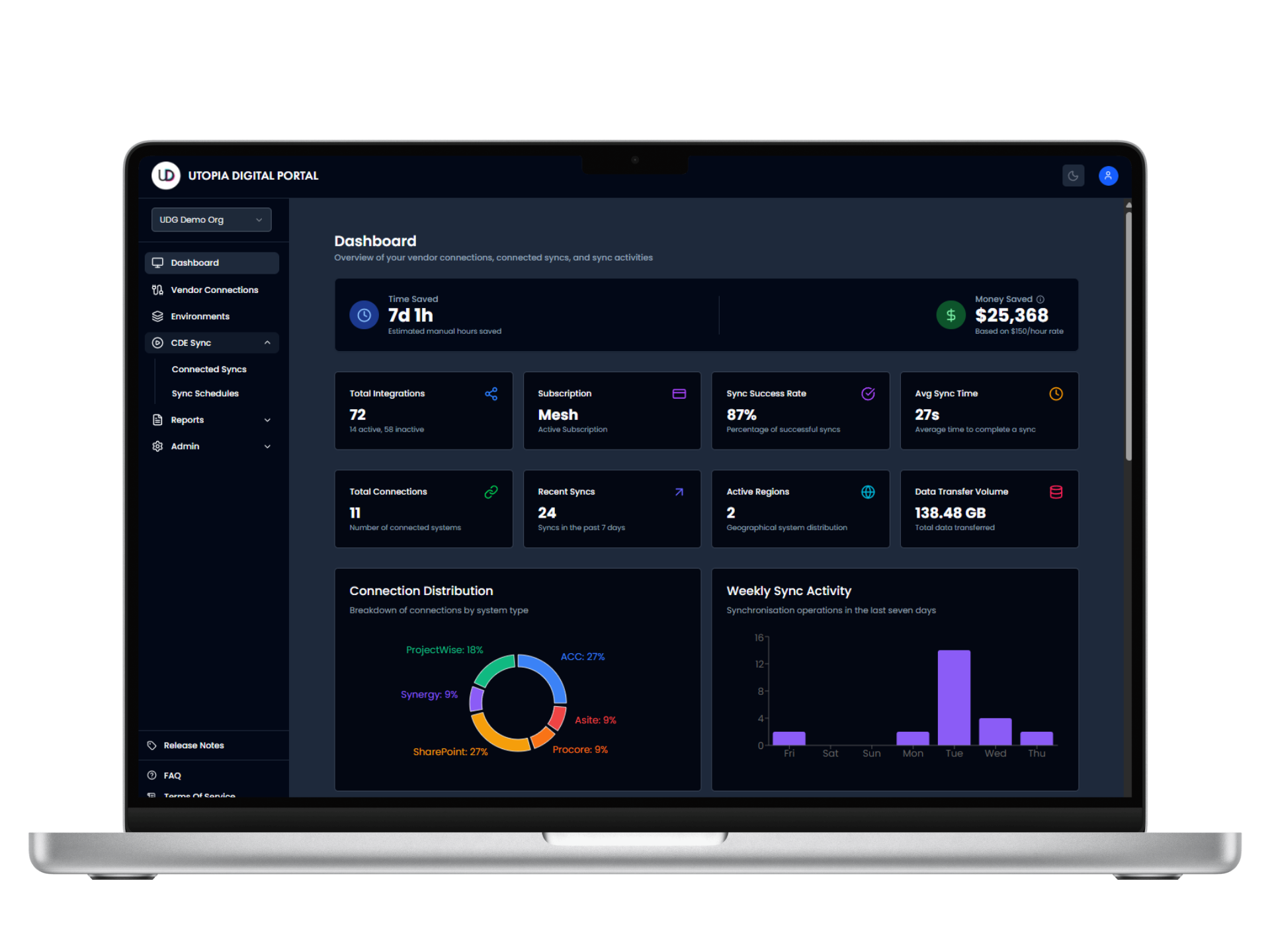
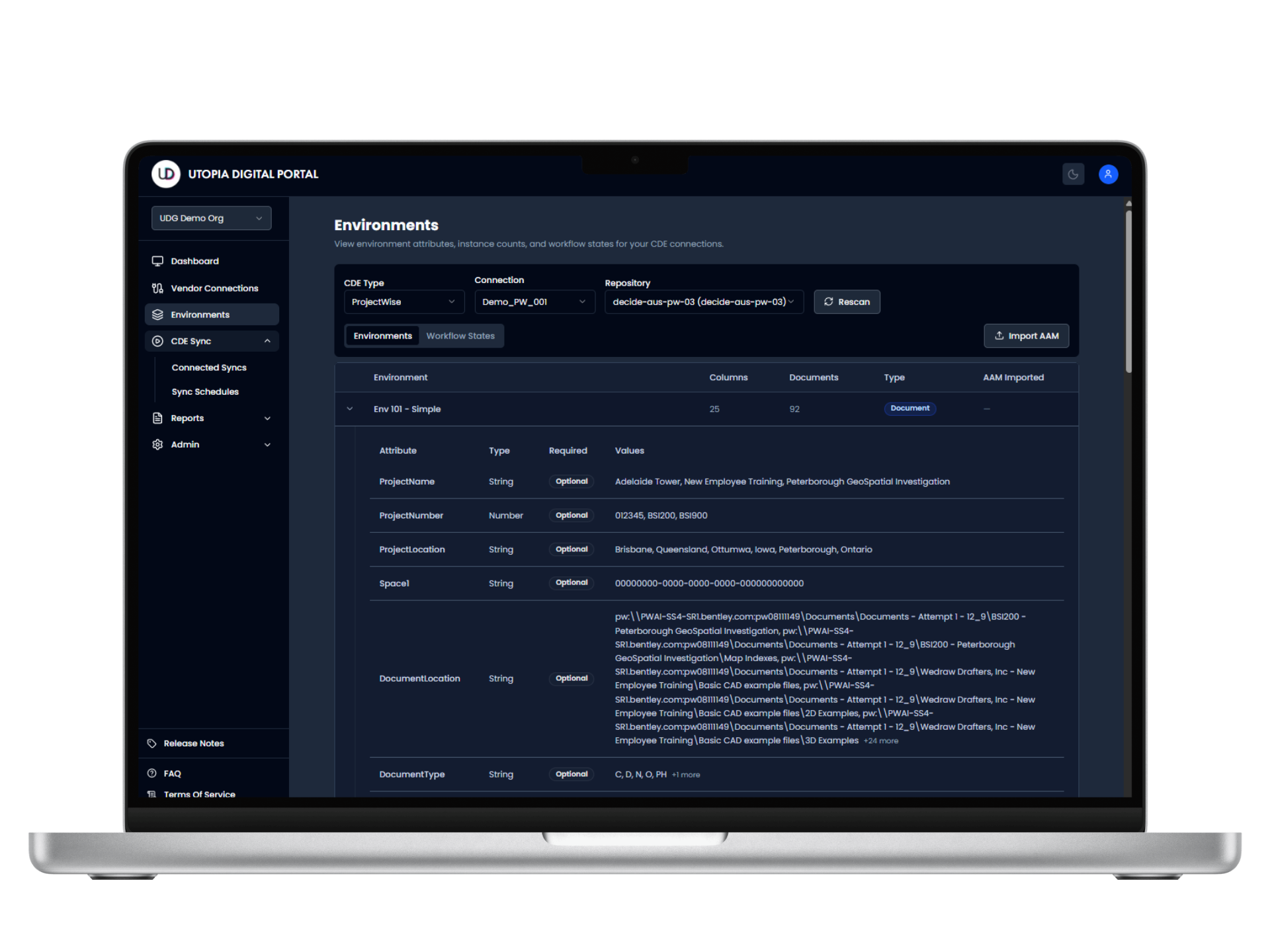
CDE Sync™ is deployable in any Microsoft Azure data centre region, giving you full control over data sovereignty and residency.
— 9. Connected CDEs —